Know what your web apps actually connect to.
WyrmSight scans each one as often as daily and shows you every connection, how it got there, and what changed, so you've seen it all before anyone asks.
Free for up to 3 apps. No credit card.
Not an AI product.
WyrmSight loads your pages in a real browser and records what happened. The capture, the change detection and the alerts are deterministic. Where AI is used, and where it isn't
The vendors you approved load vendors you didn't.
When someone opens one of your pages, their browser fetches scripts, fonts and data from other companies. Some of those scripts then load more, from companies further down the chain. That traffic goes from the visitor straight to the vendor. It never touches your servers or your repository, so the tools watching those two places don't see it.
Practitioners call this their blind spot.
- 11third-party domains contacted by a typical site. One site in ten contacts 46 or more.
- 48%of sites had their set of third-party domains change at least once in a week.
- 1 in 5third-party domains, at least, is reached only through another third party.
From daily WyrmSight scans of 200 public, household-name websites, October 20 to 26, 2026. 197 gave usable captures. These are homepages and marketing sites, which are separate from the products those companies sell. How the numbers were collected
How it works
Add your applications. Sign up and add a URL, a list of domains or a CSV. The first scan starts right away and usually finishes in a few minutes. There's nothing to install and no script tag to add.
See what each one is made of. Every connection, first party and third party, across every application. You get each vendor's purpose where WyrmSight can identify it, and the chain of loads that brought it onto the page.
See what changes. Scans run on a schedule, daily on paid plans. You get a dated history and a change feed, so nobody has to rebuild the picture.
What you see
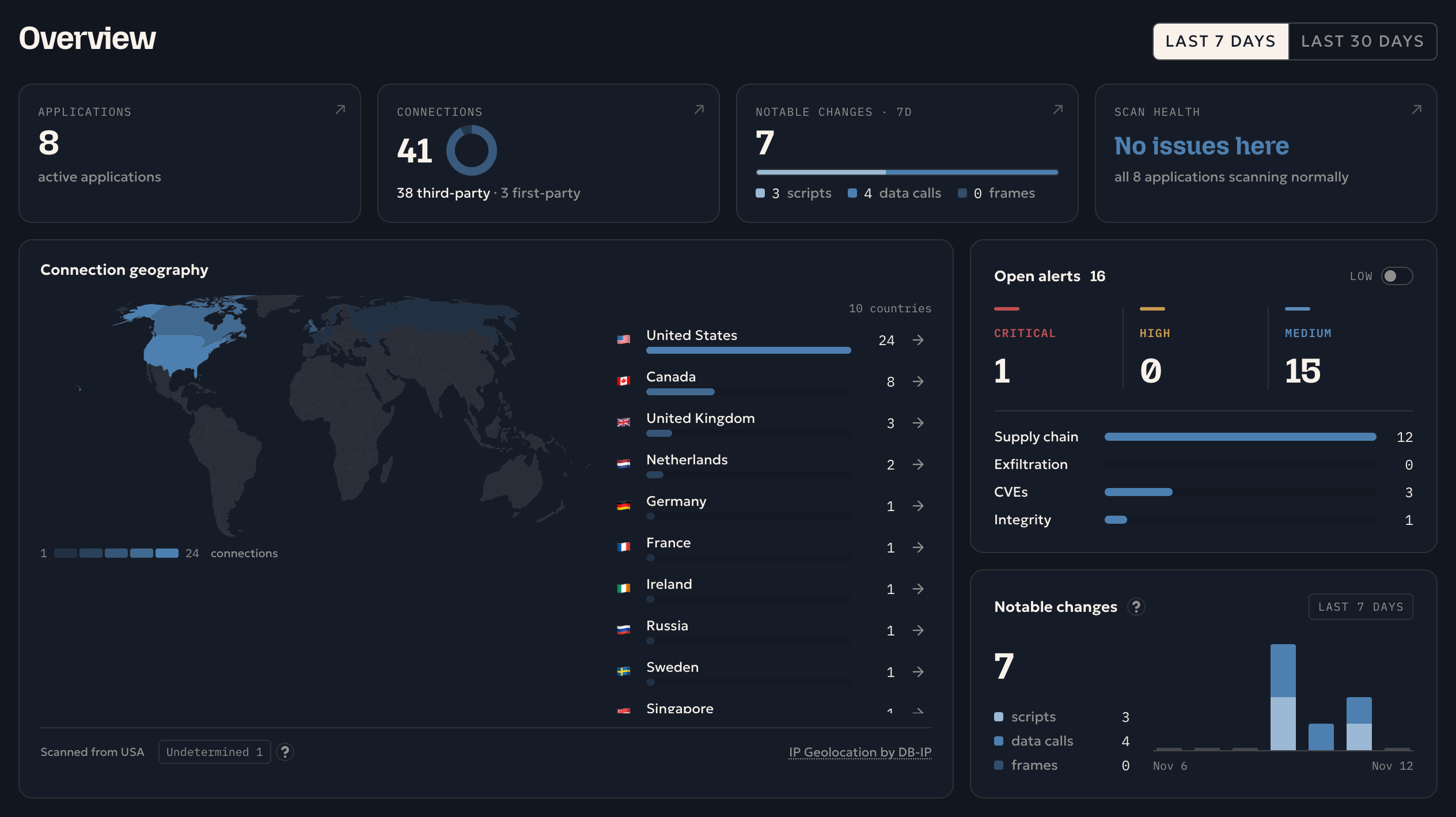
Connections
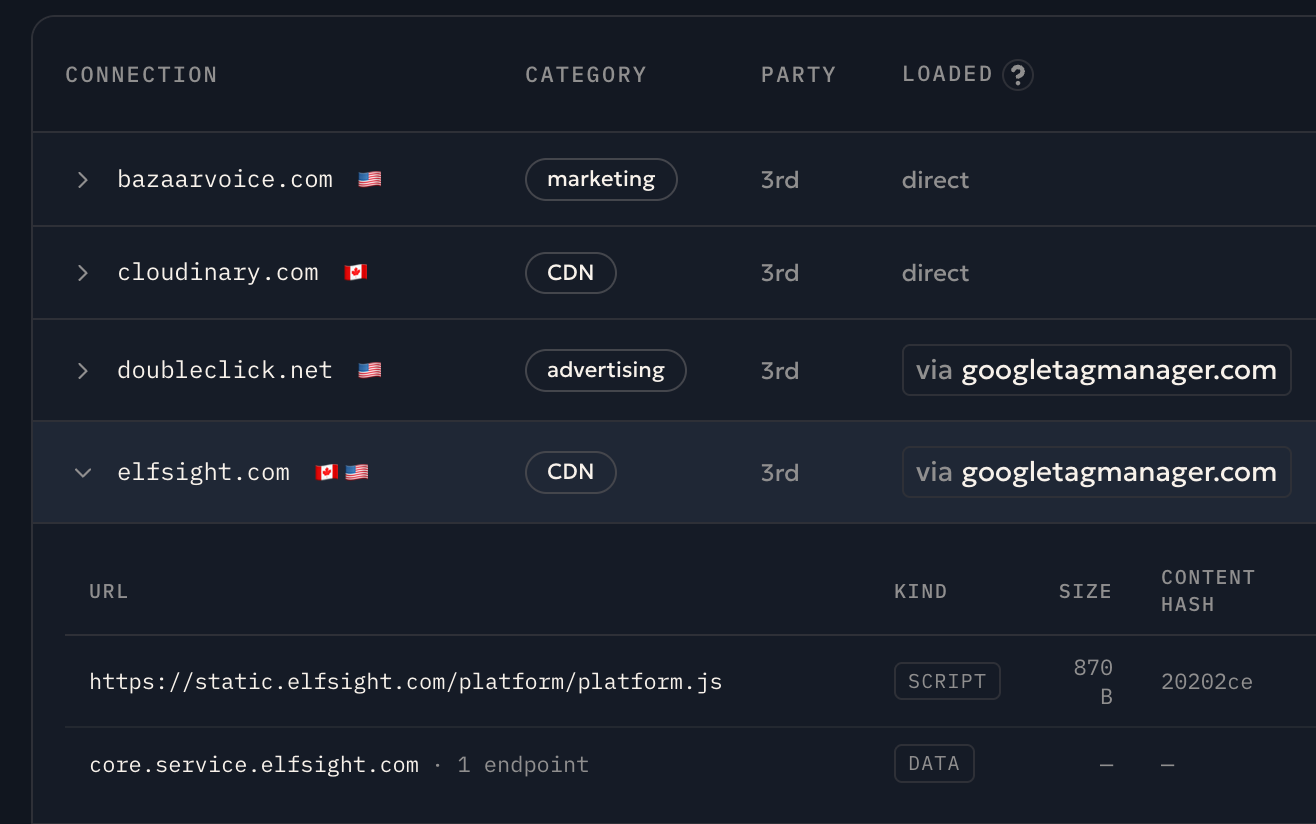
Every domain your applications connect to, for one application or across all of them, split into first party and third party. Where WyrmSight can identify what a vendor is for (analytics, advertising and so on), it says so. Each connection shows how it got there: loaded by your page, or by another vendor's script.
Changes
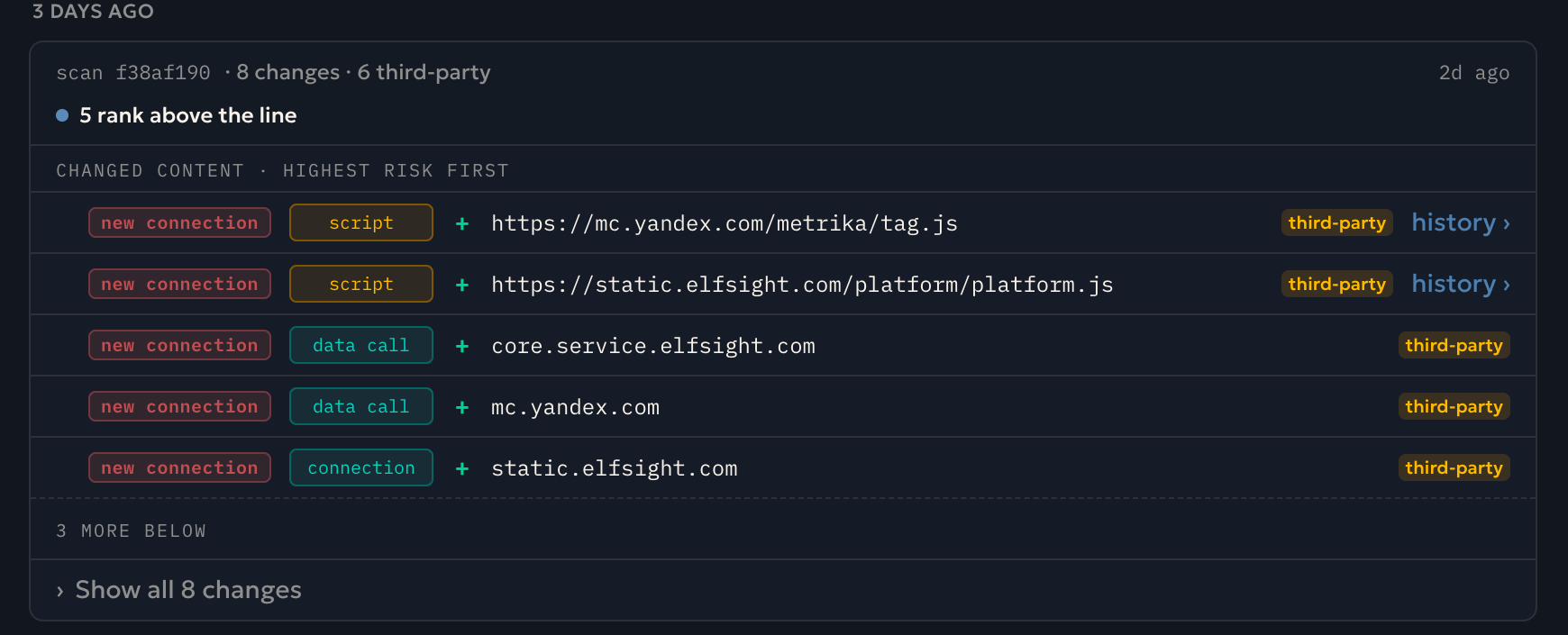
When a connection or a third-party script first appeared, when it changed and when it went away, each with a date. The change feed lists what moved since you last looked.
Alerts
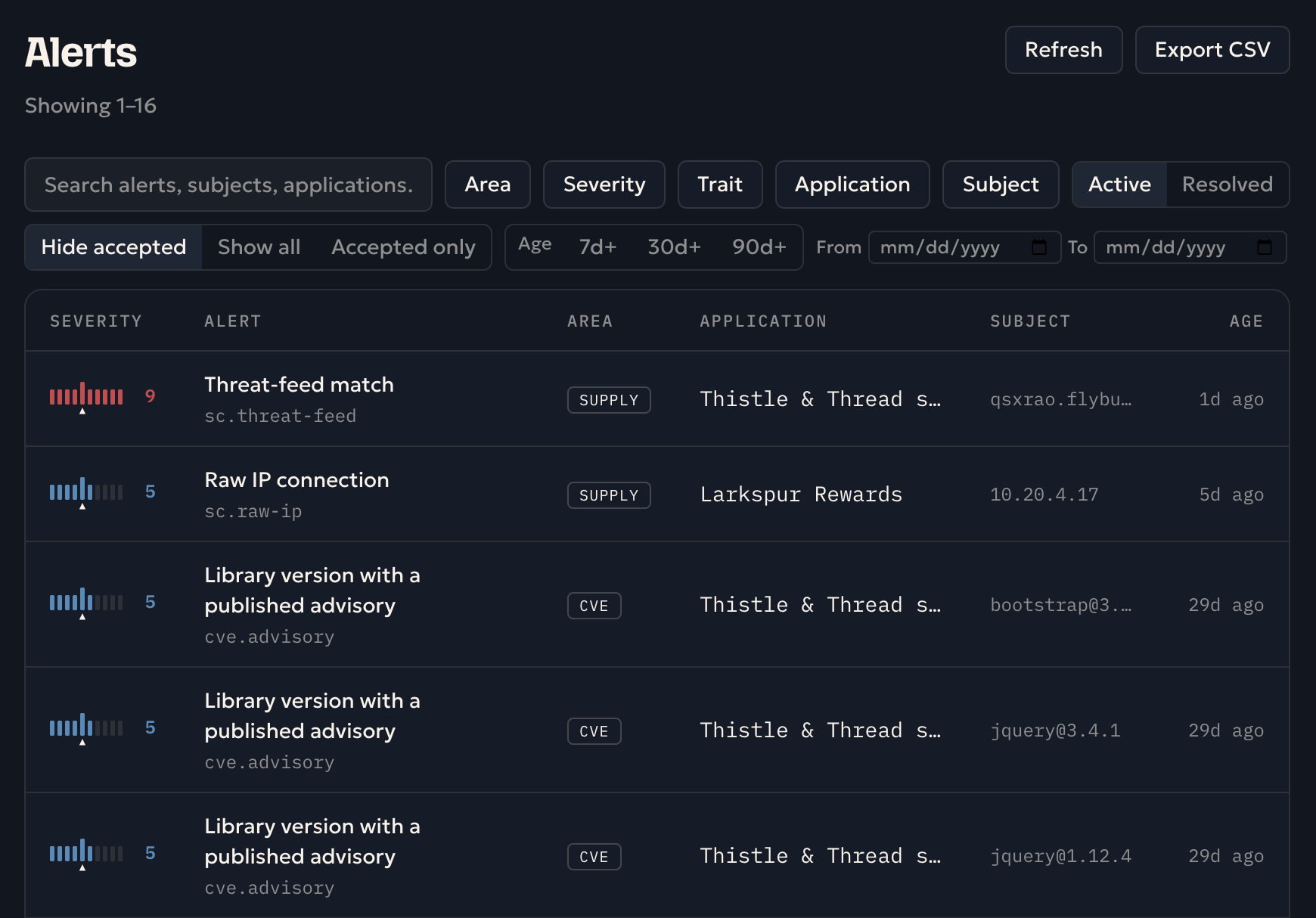
An alerts list, an email when something new needs attention, and a digest. A library version with a published advisory triggers an alert. So does a connection to a domain on a threat-intelligence list. Once you've reviewed an alert, you can accept it.
Risk areas
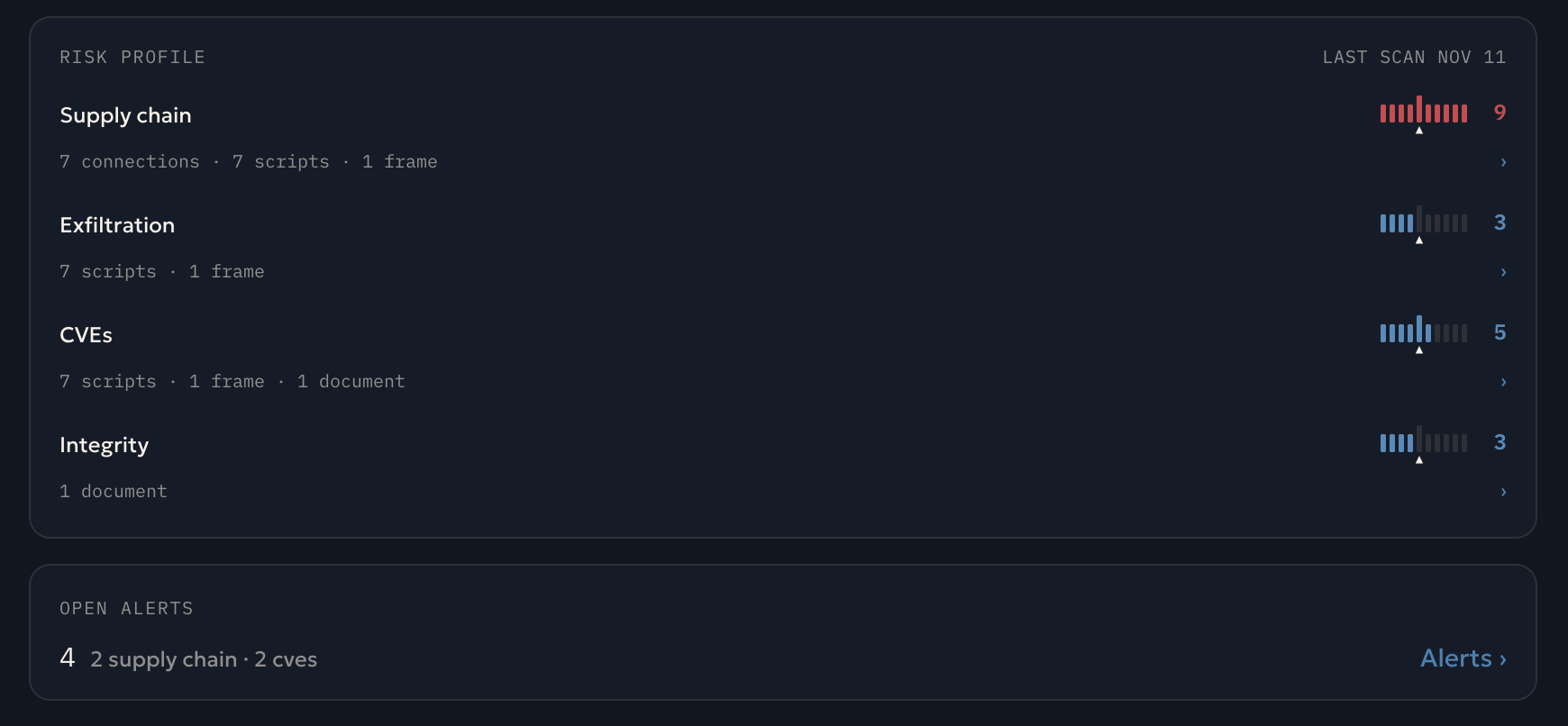
Each application gets a profile across four areas: Supply chain, Exfiltration, CVEs and Integrity. Each area stands on its own and there is no single score. The list of what is checked in each area is published in the product. Exfiltration covers where data goes. It doesn't recognize what the data is.
Also included
Tech stack. The common frameworks and libraries each application uses, and how many WyrmSight couldn't identify.
Location. The country each connection is in, where an IP lookup can place it. List the countries you allow and a connection anywhere else triggers an alert.
A starting CSP. A draft Content Security Policy built from what WyrmSight observed. It's basic, and enforcing it is up to you.
Export and filters. The main lists can be filtered and exported to CSV.
Teams. Invitations, roles, an audit log and multi-factor sign-in.
Safe to point at production
It only observes. WyrmSight doesn't spider, inject traffic, or try to bypass authentication. A scan is no different than a human with DevTools open.
What it does
- Loads each application the way a visitor's browser would and records every connection the page makes.
- Signs in to pages behind a login, on the Professional plan, with credentials you provide.
- Scans every day on paid plans, and whenever you ask. A scan usually takes minutes.
- Reports what it saw and what changed.
What it doesn't do
- Look for vulnerabilities. WyrmSight isn't a vulnerability scanner.
- Block, fix or enforce anything. The people who run the site decide what changes.
- Monitor in real time.
- Analyze what a script's code does, or recognize personal data in what a page sends.
- Produce compliance reports, attestations or evidence packs.
"Are we affected?"
In June 2024 the polyfill.io domain changed hands and began serving malicious code, reportedly to more than 100,000 sites. Security teams got the same question from leadership that week. Answering it meant working out, application by application, whether any page loaded that domain.
With WyrmSight you filter a list you already have: every application, every connection, and the date each one first appeared.
Built by a pen tester
WyrmSight is built by Jason Gillam, a web application penetration tester with nearly 30 years in technology, more than half of that in application security.
On a pen test, the proxy log shows every connection a page makes. For a lot of organizations that's the only time anybody sees the full view, and then the engagement ends. WyrmSight keeps that view running for every application, all year.
The Blind Spot in the Browser
What your web pages are made of, where each piece comes from, and what changes over time.
A 15-page paper by Jason Gillam. PDF, no sign-up.
Want to see it on your own site first? The five-minute DevTools check needs nothing but a browser. Try it
Plans
Every signup starts with a week of Starter. After that, stay on Free or pick a plan.
Hatchling (Free)
$0
Drake (Starter)
$44.10 a month per 5 applications
When paid annually ($529.20 a year). $49 a month when paid monthly.
Wyrm (Pro)
Early Access$225 a month per 25 applications
When paid annually ($2,700 a year). $250 a month when paid monthly.
Questions
Do I have to install anything or change my site?
No. WyrmSight runs in the cloud and loads your pages from the outside, the way a visitor would. There's no agent and no script tag. That also means it can only reach applications that are on the public internet.
Does WyrmSight use AI?
Mostly no. WyrmSight uses AI for one job in the product, a simple classifier that suggests what a third-party domain is typically used for, such as ad pixels or a tag manager. It sees only the domain name. Nothing else from your scans is sent to a model, and your data isn't used to train one. The AI Usage Policy has the details.
How often does it scan?
Daily on the paid plans and during the trial, weekly on Free. You can also run a scan whenever you want, within your plan's allowance.
Can it see pages behind a login?
Yes, on the Professional plan. A scripted session lets you set up a series of steps, which can include signing in, so WyrmSight can scan a page behind the login. The credentials you provide are stored encrypted and used only during a scan.
How is this different from an SBOM or dependency scanning?
Those cover the code your team builds and ships. They don't cover what a visitor's browser fetches when the page loads, such as a script a tag manager adds after the build. WyrmSight records that part.
Does it produce PCI or other compliance reports?
No. You can export the main lists to CSV, and what that record means for your obligations is your call.
Where is my data kept?
WyrmSight is hosted on AWS in the United States. How long each kind of data is kept is set out in the Privacy Policy.
What does your site connect to?
Add a URL. The first scan usually finishes in a few minutes.
Free for up to 3 apps. No credit card.